Creating and managing promotions
Promotions make your listing more visible and give customers a real reason to book now. Here you'll learn how to set up a percentage discount, free mileage, or both per vehicle, define a validity period, and manage your promotions afterwards.
A promotion is one of the most powerful tools you have as a host. For each vehicle, you decide how long it runs and whether to offer a percentage discount on the booking, add free mileage, or combine both. Your listing will then stand out in search results and catch people's eye. Best of all: customers who have saved your car with a favourites heart are automatically notified the moment you launch a promotion.
- Where to find promotions in the app
- How to select the right vehicle
- Setting a title, validity period, and discount type (percentage, free mileage, or both)
- What visibility means for your bookings
- How to review and delete active promotions
1
Opening the Calendar and tapping Manage Promotions
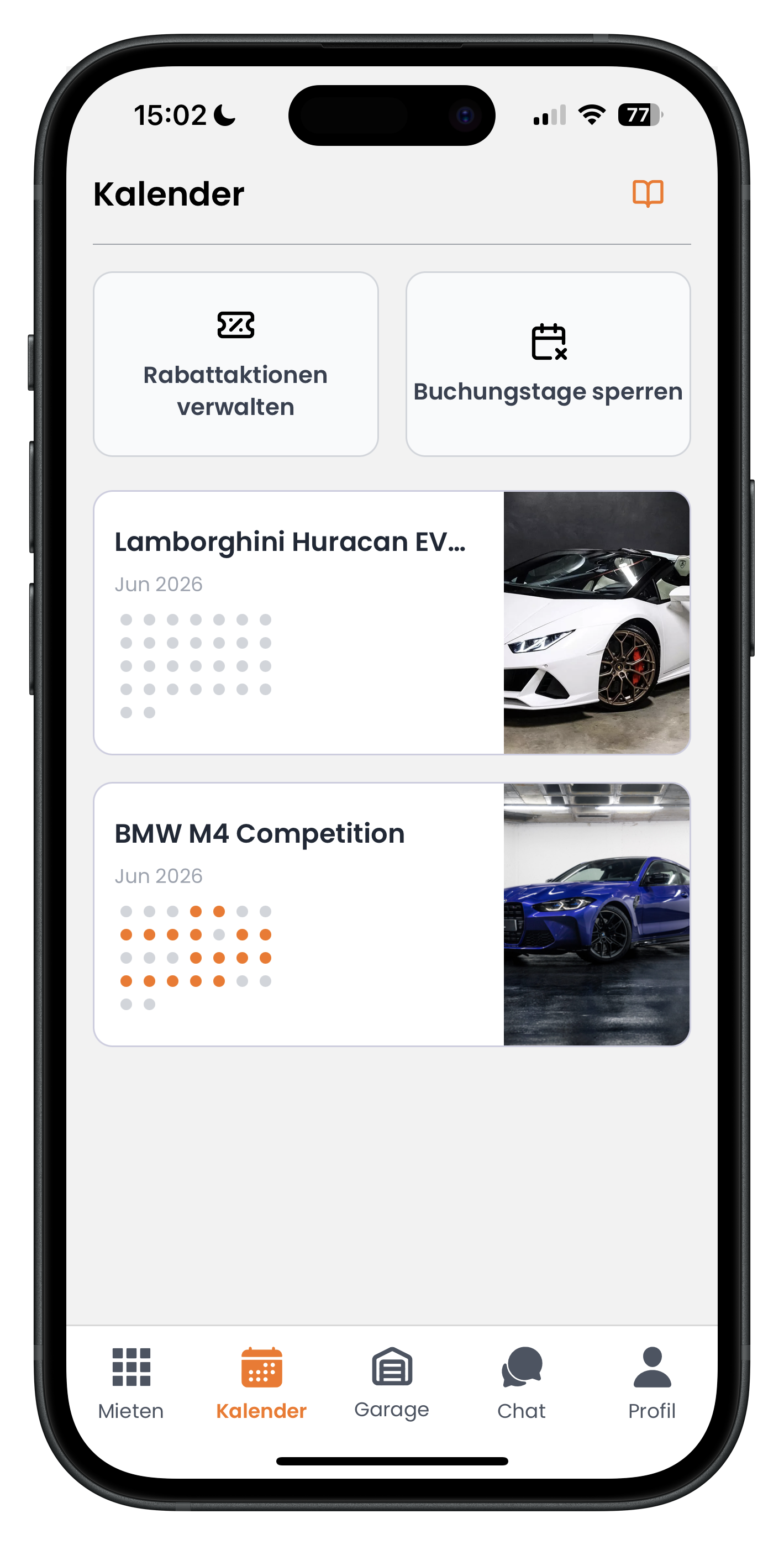
Tap Calendar in the bottom navigation. At the top you'll see two tiles side by side: on the left, Manage Promotions with a small ticket icon, and on the right, Block Booking Days. Tap the left tile, Manage Promotions, to get started. Below that you'll also see your vehicles with their booking calendars, where booked days are highlighted in colour.
- The Calendar is the second icon from the left in the bottom bar
- The Block Booking Days tile is only needed when a vehicle is unavailable on specific days
- The orange highlight in the navigation shows you're currently in the Calendar
2
Selecting the vehicle for your promotion
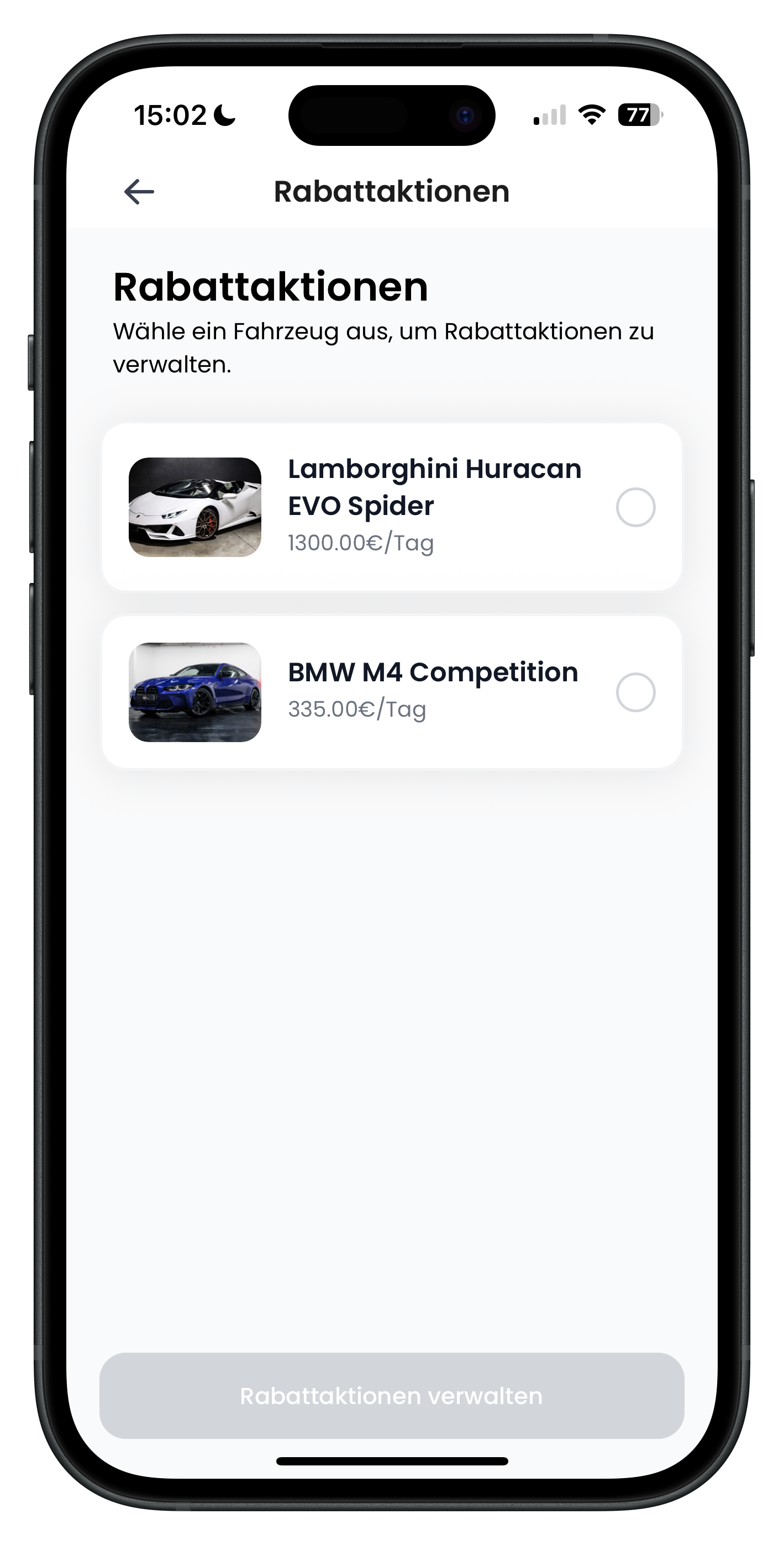
At the top of the Promotions screen you'll see the prompt "Select a vehicle to manage promotions." Below it, all your listed vehicles are shown with a photo, name, and daily rate — for example, the Lamborghini Huracan EVO Spider or the BMW M4 Competition. To the right of each entry is a round selection button. Tap it for the vehicle you want to run a promotion on, then tap the Manage Promotions button at the bottom.
- Each promotion applies to a single vehicle only, not your entire fleet
- The daily rate shown below the vehicle name helps you identify the right car
- The button at the bottom only becomes active once you've selected a vehicle
You manage promotions per vehicle because each one has its own demand. A car that isn't getting many bookings will benefit far more from a promotion than your most popular one. This gives you precise control over where you create incentives.
3
Reviewing existing promotions and creating a new one
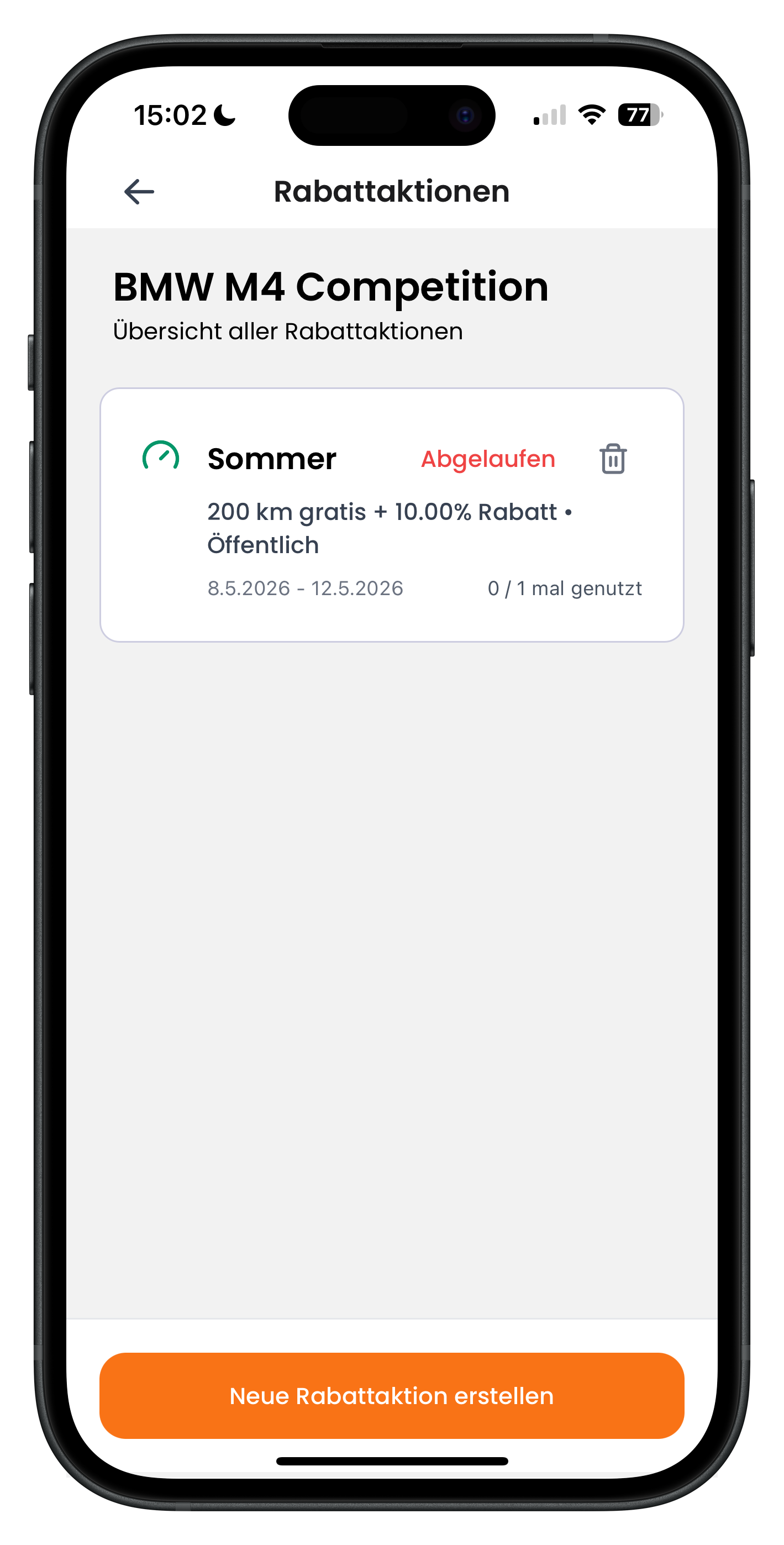
You'll now see the selected vehicle's name at the top — here BMW M4 Competition — followed by "Overview of all promotions". Existing promotions appear as cards showing the title (e.g. Summer), the discount details, the validity period, and how many times the promotion has been used. An expired promotion is flagged with a red Expired label. Tap the bin icon to delete a promotion. To create a new one, tap the orange Create new promotion button at the bottom.
- The line "0 / 1 times used" shows you how many times the promotion has been redeemed
- Public means the promotion is visible to all customers
- The bin icon removes a promotion from your listing
4
Setting the title, validity period, and discount type
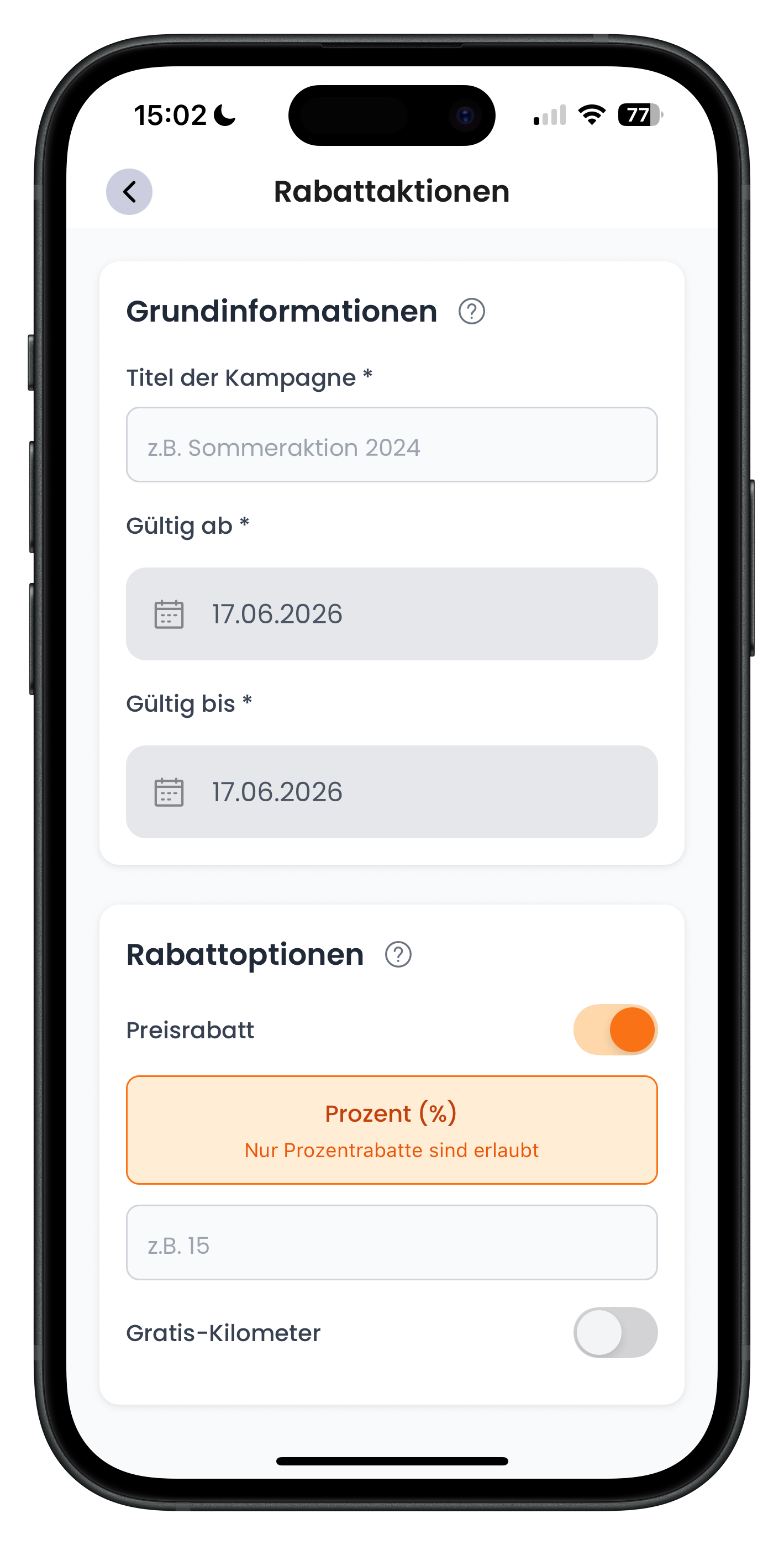
In the Basic information section, enter the Campaign title at the top — for example "Summer promotion" or "Weekend deal". Below that, use the two date fields Valid from and Valid until to set the period the promotion runs. In the Discount options section, toggle on the Price discount switch: it turns orange, then select the Percentage (%) tile and enter your value in the field below — for example 15. The Free mileage toggle is switched off for now.
- The title is just for your own reference and makes it easy to find later
- Valid from and Valid until can be set to the same day or span multiple days
- The price discount only accepts percentages — for example 10 or 15 — not a fixed € amount
You don't have to choose between a percentage discount and free mileage. You can enable both toggles at the same time and offer something like "200 km free + 10% off". Combined promotions like this are particularly eye-catching and often win over customers who are still on the fence.
5
Adding free mileage and understanding visibility
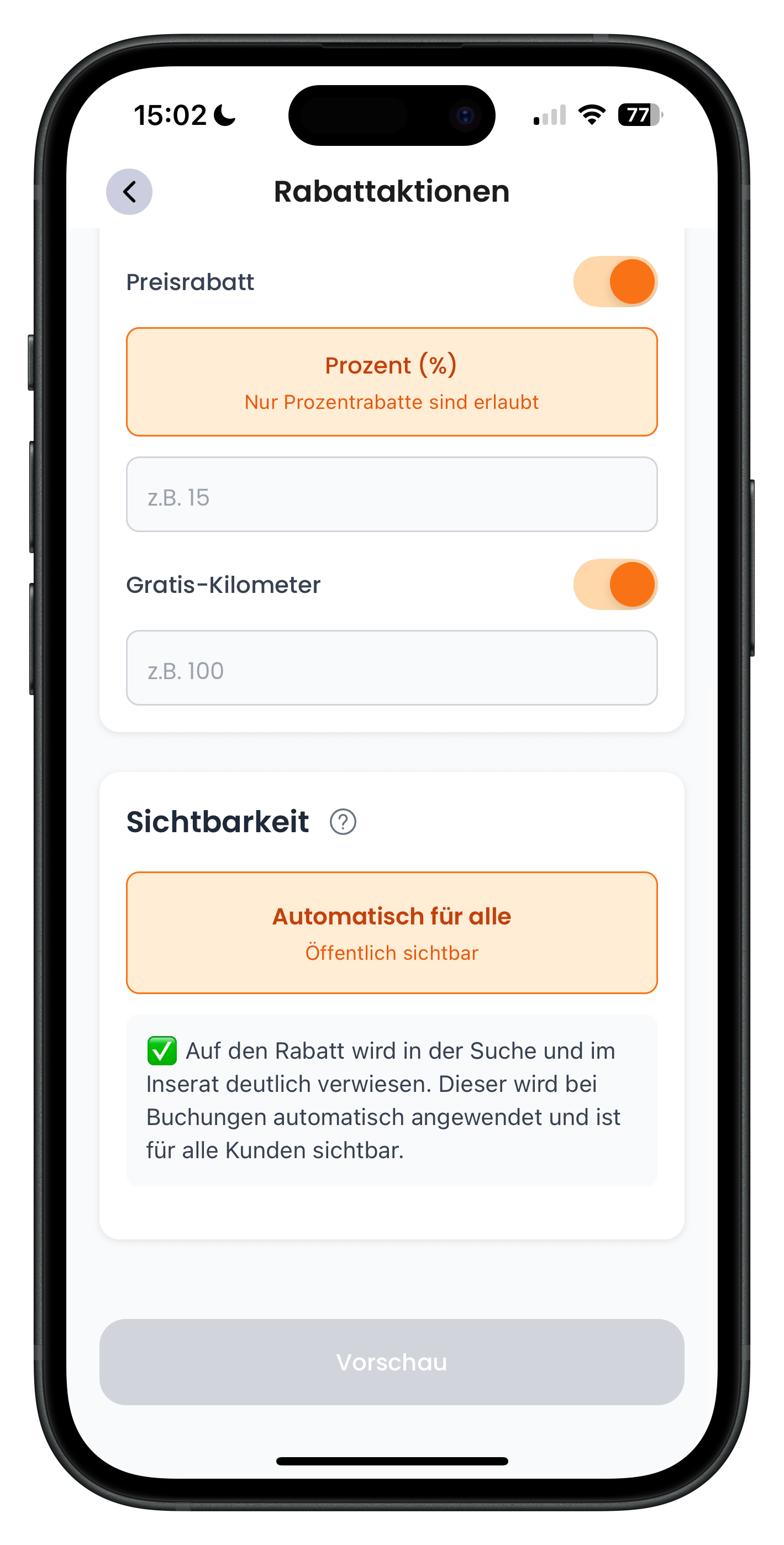
Scrolling down a little further, you can also enable the Free mileage toggle. It turns orange and you enter the number of kilometres to include — for example 100. Below that is the Visibility section with the Automatic for everyone / Publicly visible tile. The green note below it explains: the discount is clearly shown in search results and on your listing, it is applied automatically at the time of booking, and it is visible to all customers. Once everything looks right, tap Preview at the bottom to review and activate your promotion.
- Free mileage is added on top of the vehicle's standard included mileage
- With public visibility, the discount is deducted automatically when a booking is made
- The preview shows you exactly how your promotion will appear before you go live
Once your promotion is live, your listing stands out in search results and catches the eye among all the other vehicles. Customers who previously saved your car with a favourites heart also receive a notification. That's exactly why the best hosts use this feature: it brings hesitant browsers back and turns them into real bookings.
Using promotions to your advantage
- Target quieter periods or vehicles with fewer enquiries
- Combine a percentage discount with free mileage when you really want to stand out
- Keep the validity period short — it creates a sense of urgency for customers
- Delete expired promotions using the bin icon to keep your overview tidy
Before launching a promotion, it's worth checking the listing itself. Up-to-date photos and a complete description make sure the discount actually converts. Find out how to update your listing in Edit listing.
Next steps
Once your promotion is running, you can expect more enquiries to come in. Make sure your calendar is up to date and block any days the vehicle isn't available under Block booking days & manage availability. The best way to respond to incoming enquiries is directly in the chat: the article Chat & rental offers as a host shows you how to reply and put together bespoke rental offers.
Frequently asked questions

Drivable Team
Help & Support
Das Drivable Team erklärt dir Schritt für Schritt, wie du die Plattform und App nutzen kannst.
21. Juni 2026
War dieser Artikel hilfreich?