Managing Your Host Wallet & Payouts
Your wallet gives you an at-a-glance view of how much money has arrived and how much is still on its way. Here you'll learn the difference between available and pending balance, how to withdraw your money via IBAN, and where to find the relevant invoices as PDFs for every booking.
The wallet is your financial hub as a host. You can view your balance, transfer it to your bank account, and pull up invoices for every booking. In this article we'll walk through each section step by step — what everything means and how to set it up.
- Understanding available and pending balance
- Enabling cash payment and setting the deposit amount
- Choosing deposit payment methods for your listings
- Adding a payout account via IBAN and withdrawing funds
- Filtering transactions and downloading invoices as PDFs
1
Opening the wallet from your profile
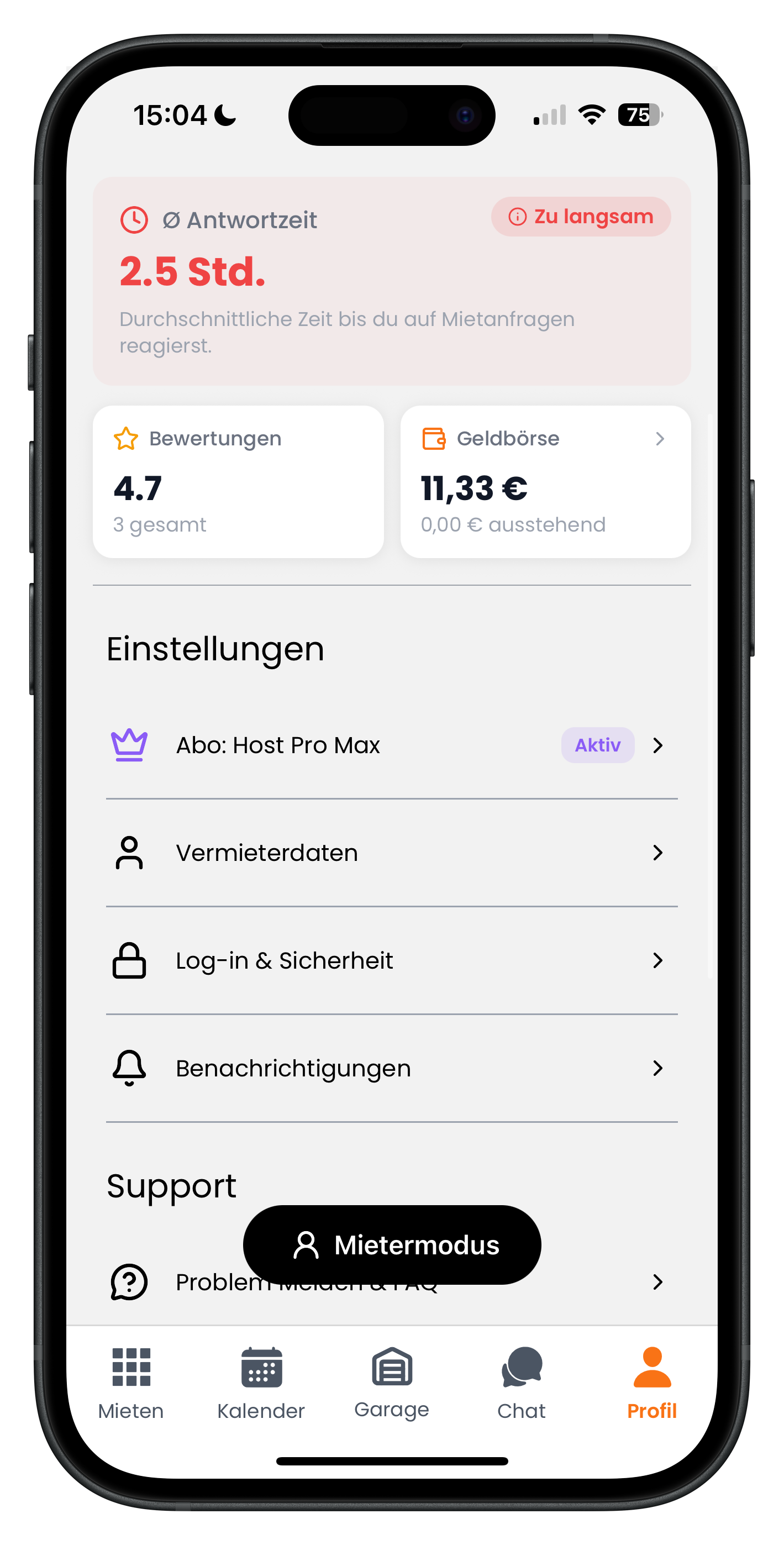
Tap Profile on the right side of the bottom navigation. At the top you'll already see a quick financial snapshot: on the left the Reviews tile showing your average rating, and on the right the Wallet tile. In our example it shows 11.33 € with 0.00 € pending in grey below. Tap the Wallet tile to open the full overview. That way you always have your figures to hand without having to dig deep into the app.
- The wallet tile sits in the top right, next to your reviews
- The larger amount is your available balance; the grey figure below it is the pending amount
- Use the "Renter mode" button to switch to the renter view at any time
2
Understanding the wallet overview and all its options
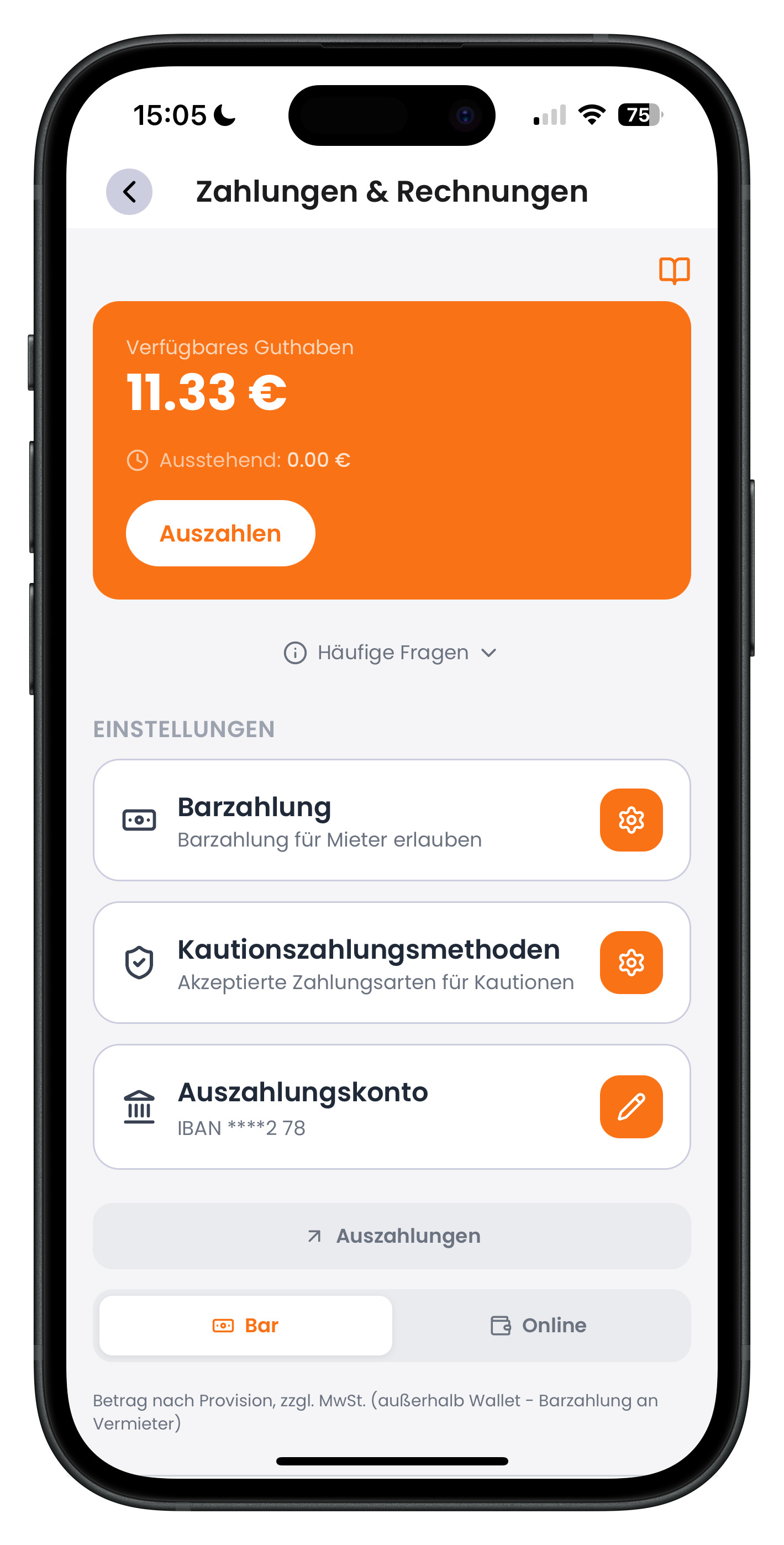
You're now in the Payments & Invoices section. At the very top, inside the orange block, you'll see your Available balance (here 11.33 €) and directly below it Pending (here 0.00 €). Use the white Withdraw button to transfer your available funds to your bank account. Below that you'll find three settings cards — Cash payment, Deposit payment methods, and Payout account — plus the Cash and Online toggles at the bottom for filtering your transaction list.
- Available = already credited; Pending = still being processed
- Tap "FAQs" to expand short explanations directly within the app
- Open each of the three settings cards by tapping the orange icon on the right
One important distinction: available balance and pending balance are two separate pots. As soon as a customer pays online, the amount lands in the pending balance first. The money is already there — it's just making its way through bank processing. After roughly 3 to 7 business days it moves from pending into your available balance, where you can withdraw it.
3
Enabling cash payment and setting the deposit amount
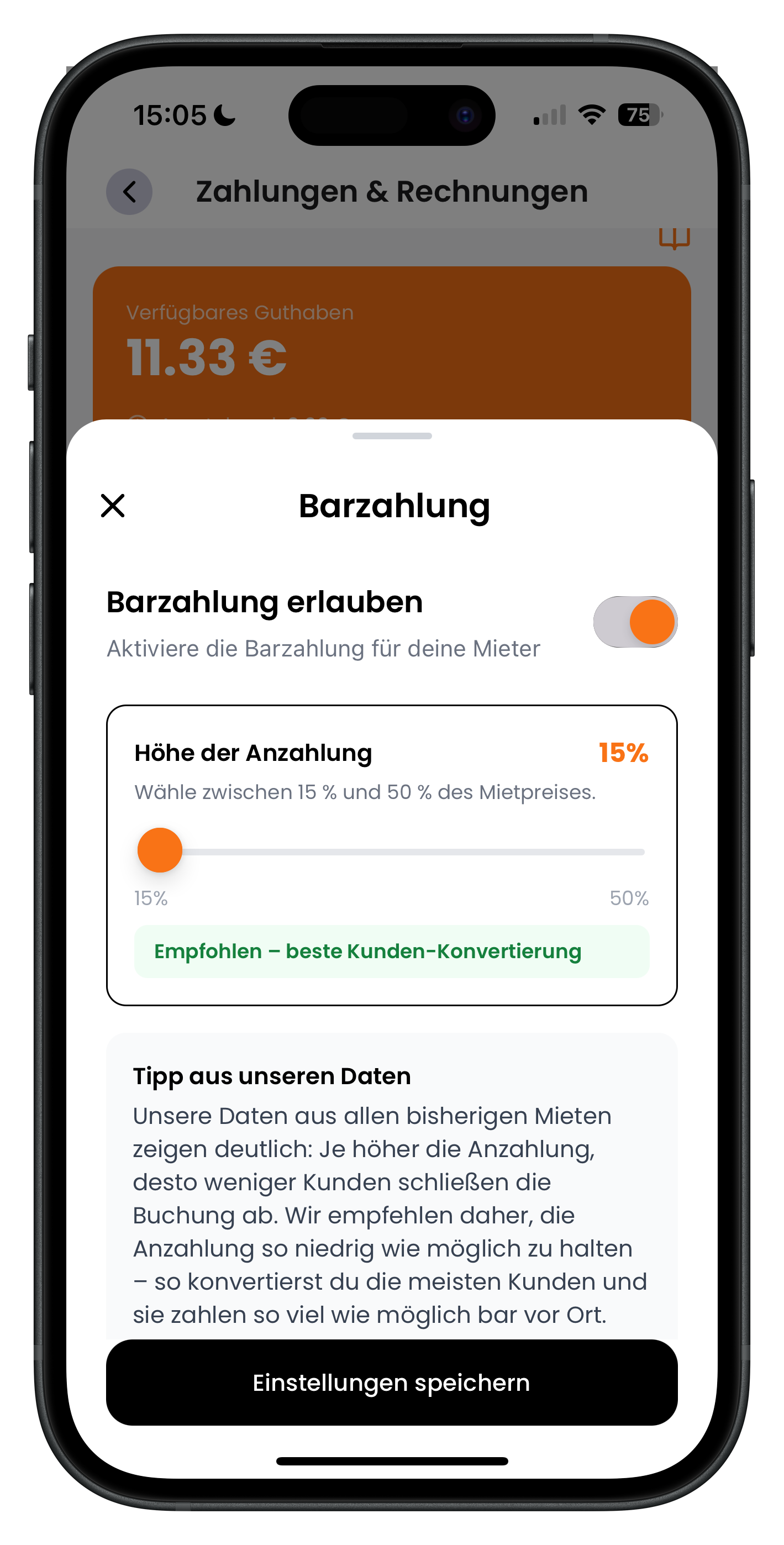
Tap the Cash payment card in the overview. A panel opens with the Allow cash payment toggle at the top. Switch it on and renters will be able to pay cash for your listings. Below that, use the orange slider to set the deposit amount — anywhere between 15% and 50% of the rental price. The customer pays this deposit online, which commits them to actually showing up. Save your settings by tapping Save settings at the bottom.
- Keep the deposit as low as you can comfortably accept
- A lower deposit generally means better conversion and more completed bookings
- The green "Recommended – best customer conversion" indicator highlights the optimal value
- Offering cash payment is worth it if your business setup allows for it
The deposit isn't a trick to collect more money upfront — it's a commitment signal. It reduces no-shows without putting customers off. Our data across all rentals to date is clear: the higher the deposit, the more customers drop off before completing a booking. Set it deliberately low.
4
Choosing deposit payment methods shown in your listing
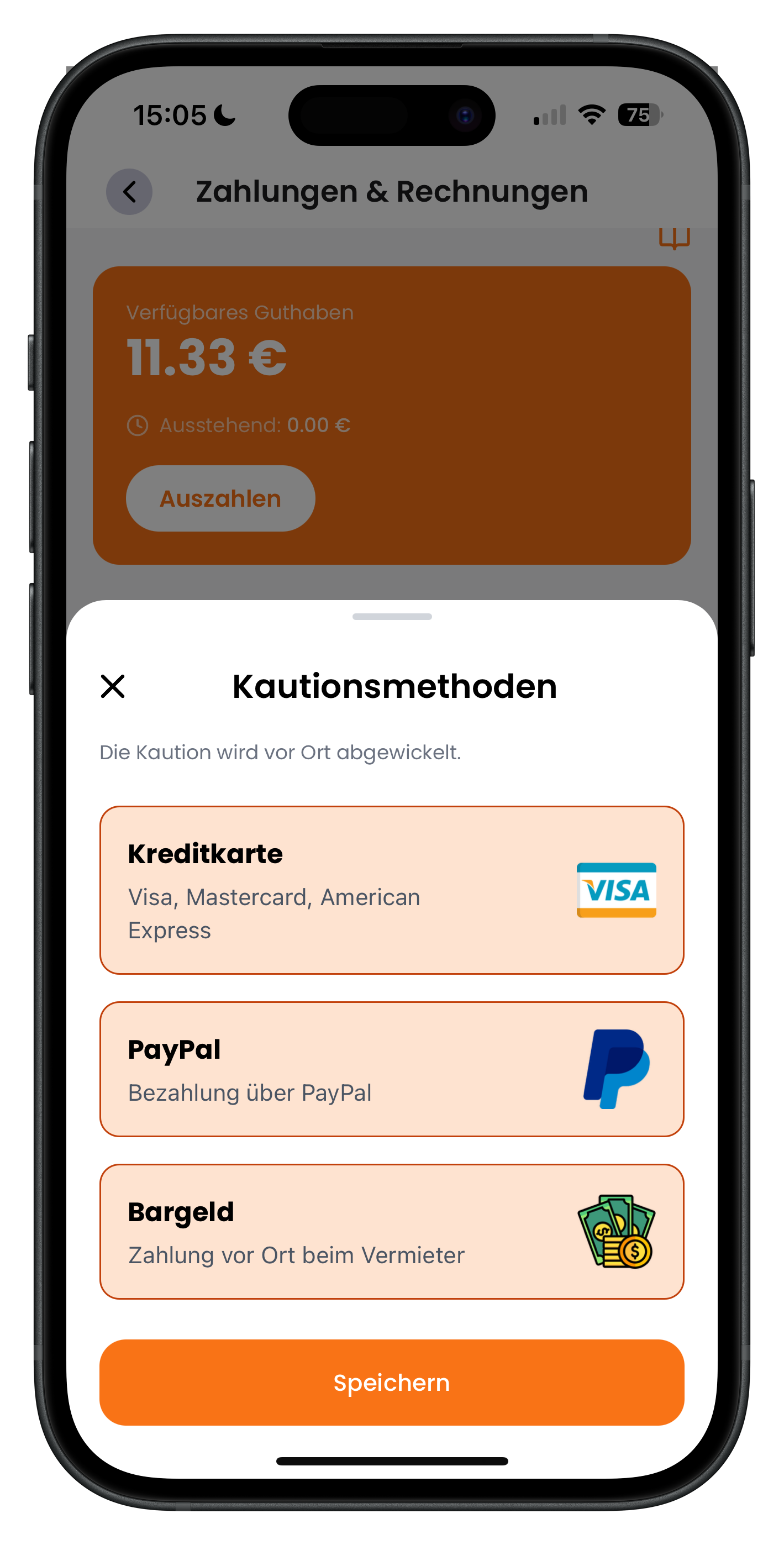
Tap the Deposit payment methods card to open a panel with the note "The deposit is handled on-site." Here you simply choose which methods are displayed in your listing: Credit card (Visa, Mastercard, American Express), PayPal, and Cash (paid in person to the host). Enable the options you accept and tap Save. The deposit itself is always handled in person between you and the customer at handover — Drivable never gets involved.
- This selection is purely display information for the listing — no payment is processed in the app
- The deposit is always settled on-site between the customer and the host
- PayPal appears here only as a possible on-site deposit method, not for rental payments
- Only enable the methods you can actually accept at the handover appointment
5
Adding a payout account with a German IBAN
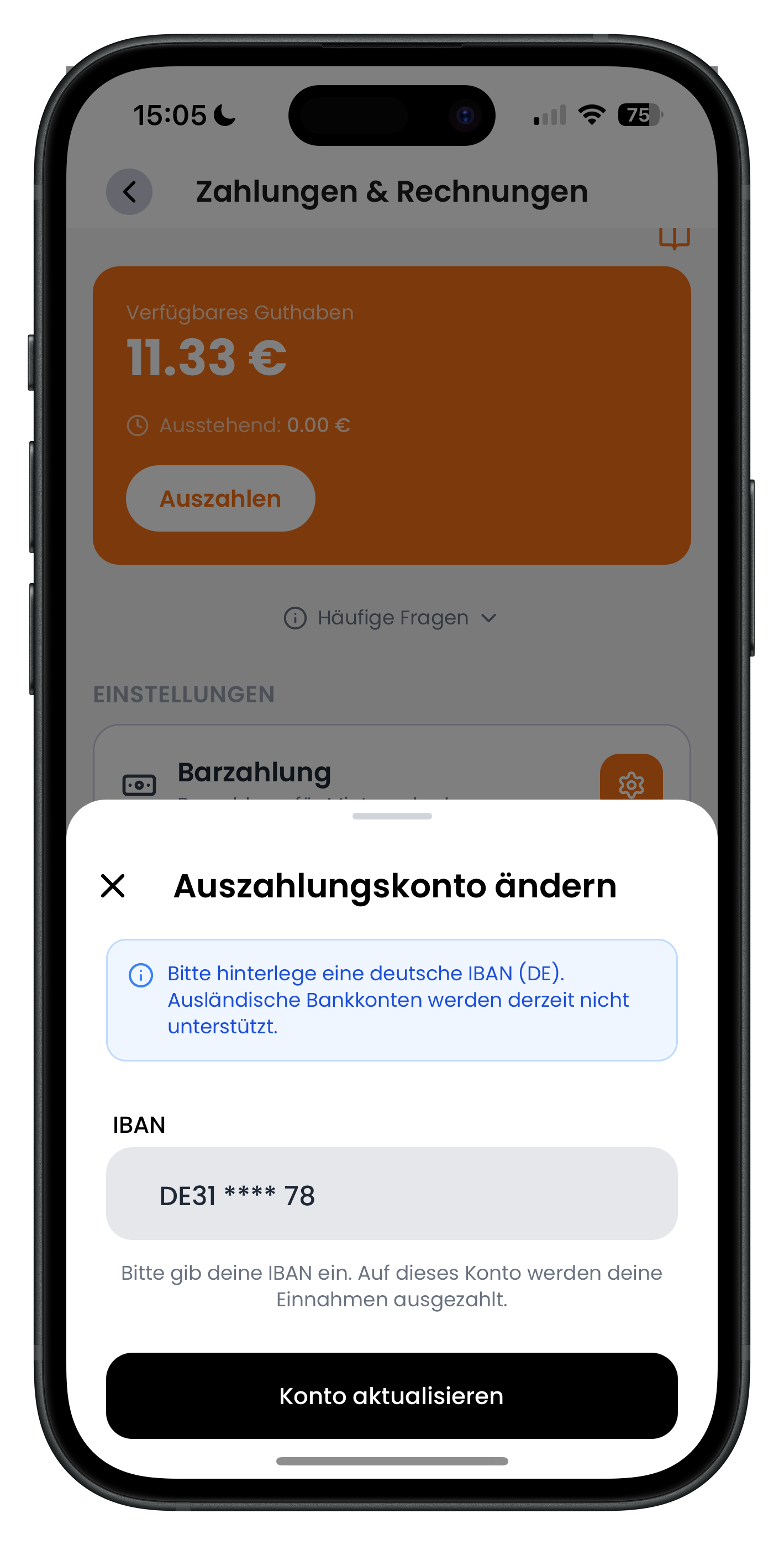
Tap the Payout account card to open the Change payout account panel. The blue box notes that currently only a German IBAN (DE) is supported — foreign bank accounts are not yet available. Enter your full account number in the IBAN field and confirm by tapping Update account. This is the account your available balance will be transferred to whenever you tap Withdraw.
- Only German IBANs (starting with DE) are currently accepted
- Double-check the IBAN carefully — all your earnings will be sent to this account
- Your saved IBAN is displayed in truncated form, for example DE31 **** 78
Your payout account and your business details go hand in hand. Make sure both are up to date and correct so that payouts and invoices run smoothly. To manage your company name, address, and tax details, see Managing your host profile & business details.
6
Filtering transactions by cash, online, and payouts
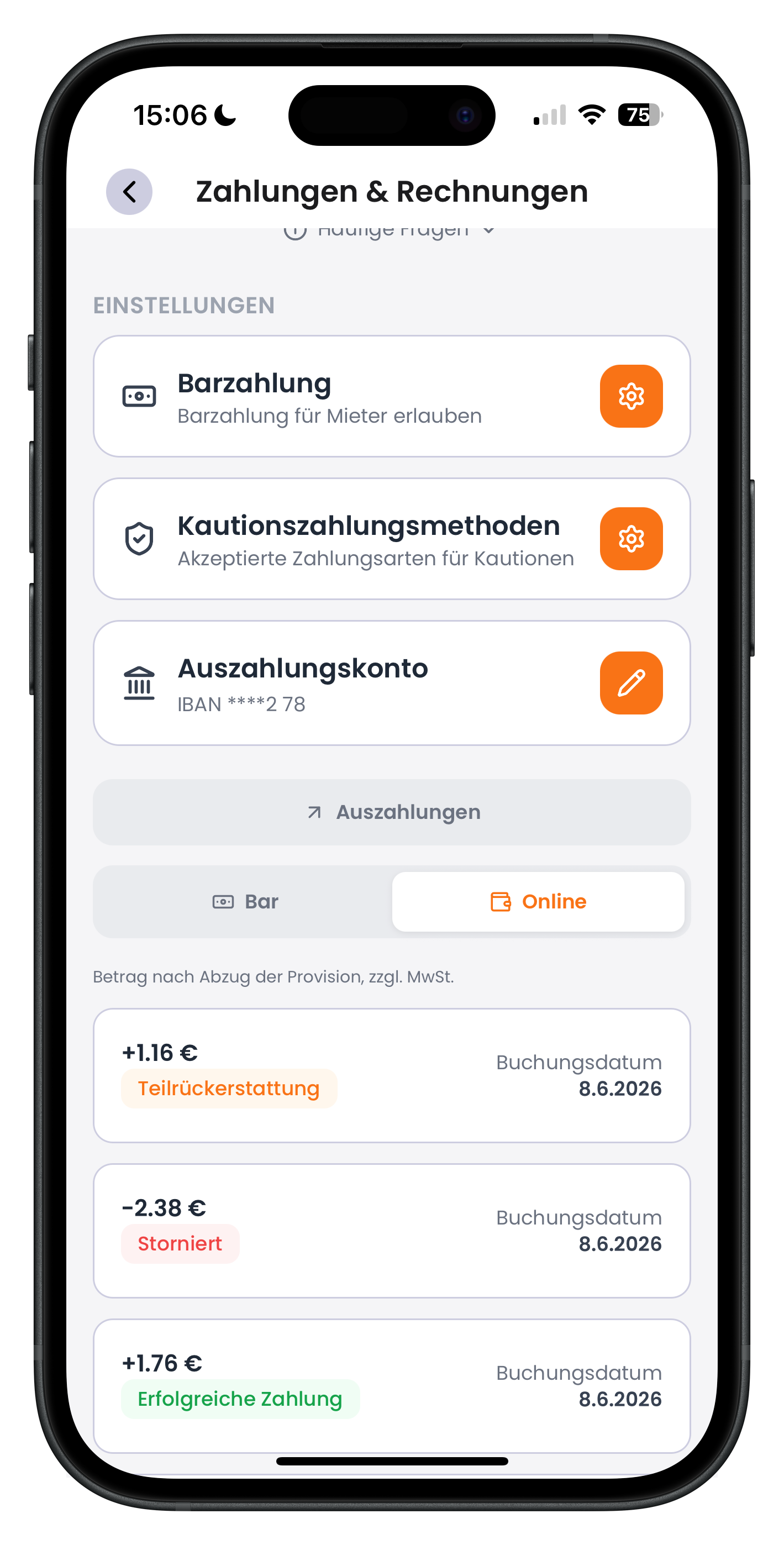
Scroll down in the wallet and your transaction list appears with three filters. Use the Cash and Online toggles to separate cash from online transactions, and tap Payouts to see only bank transfers to your account. In the example, Online is active and you can see entries such as +1.16 € Partial refund, -2.38 € Cancelled, and +1.76 € Successful payment, each with a booking date. Amounts are shown after deduction of the platform fee and inclusive of VAT.
- Cash: all cash transactions from your listings
- Online: all online payments from customers
- Payouts: all transfers from your balance to your bank account
- Colour-coded labels such as Cancelled or Successful payment show the status of each transaction
7
Viewing your payout history in detail
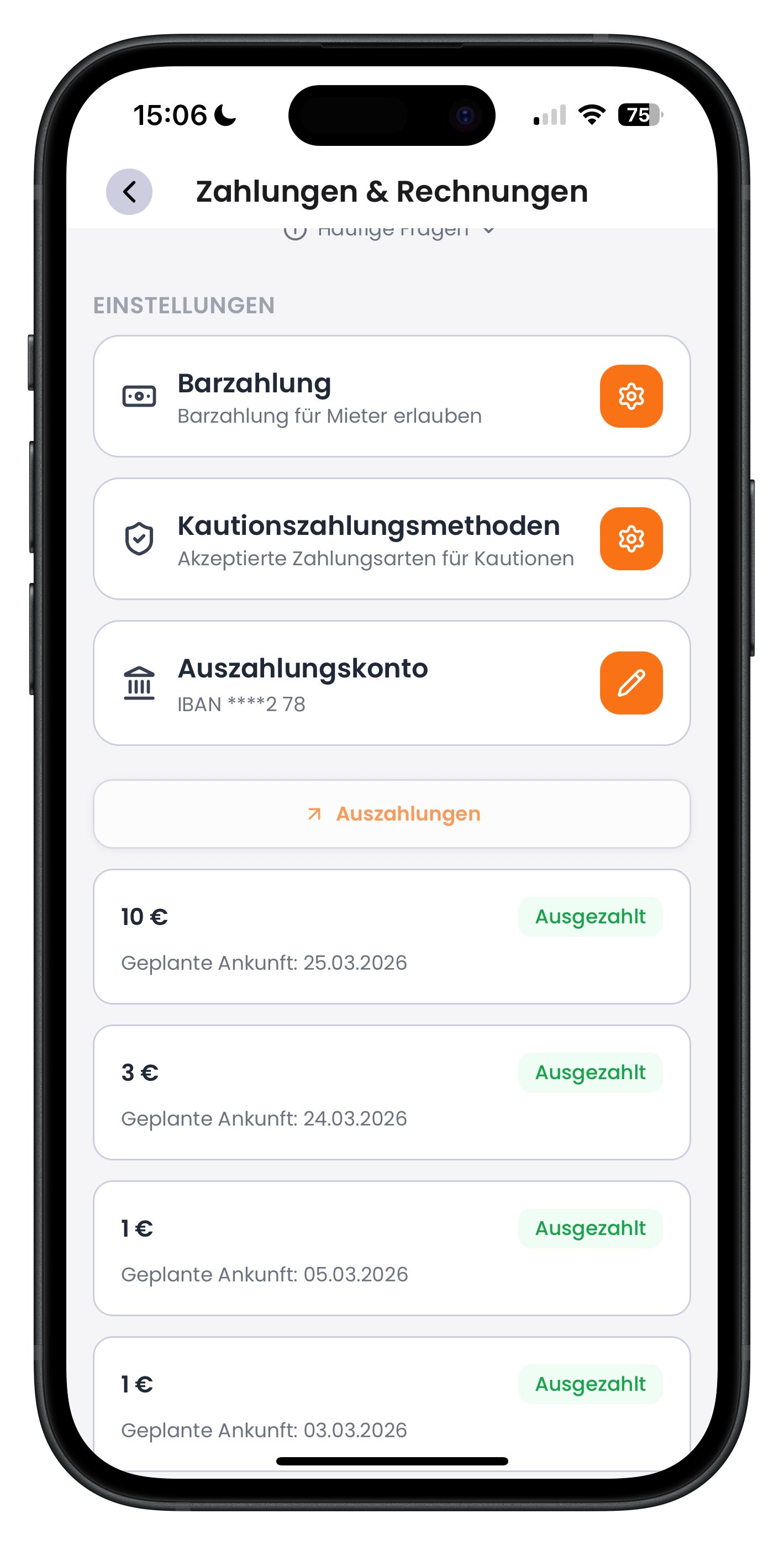
Tap the Payouts filter and the app shows your complete payout history. Each entry displays the amount paid out — for example 10 € or 3 € — the estimated arrival date (e.g. Estimated arrival: 25.03.2026), and the green Paid out status on the right. At a glance you can see when each transfer was made and when it's expected to reach your account.
- Each payout shows the amount, estimated arrival date, and status
- The green "Paid out" status means the transfer has been initiated
- A payout typically reaches your account within 3 to 7 business days
8
Downloading invoices for a transaction as PDFs
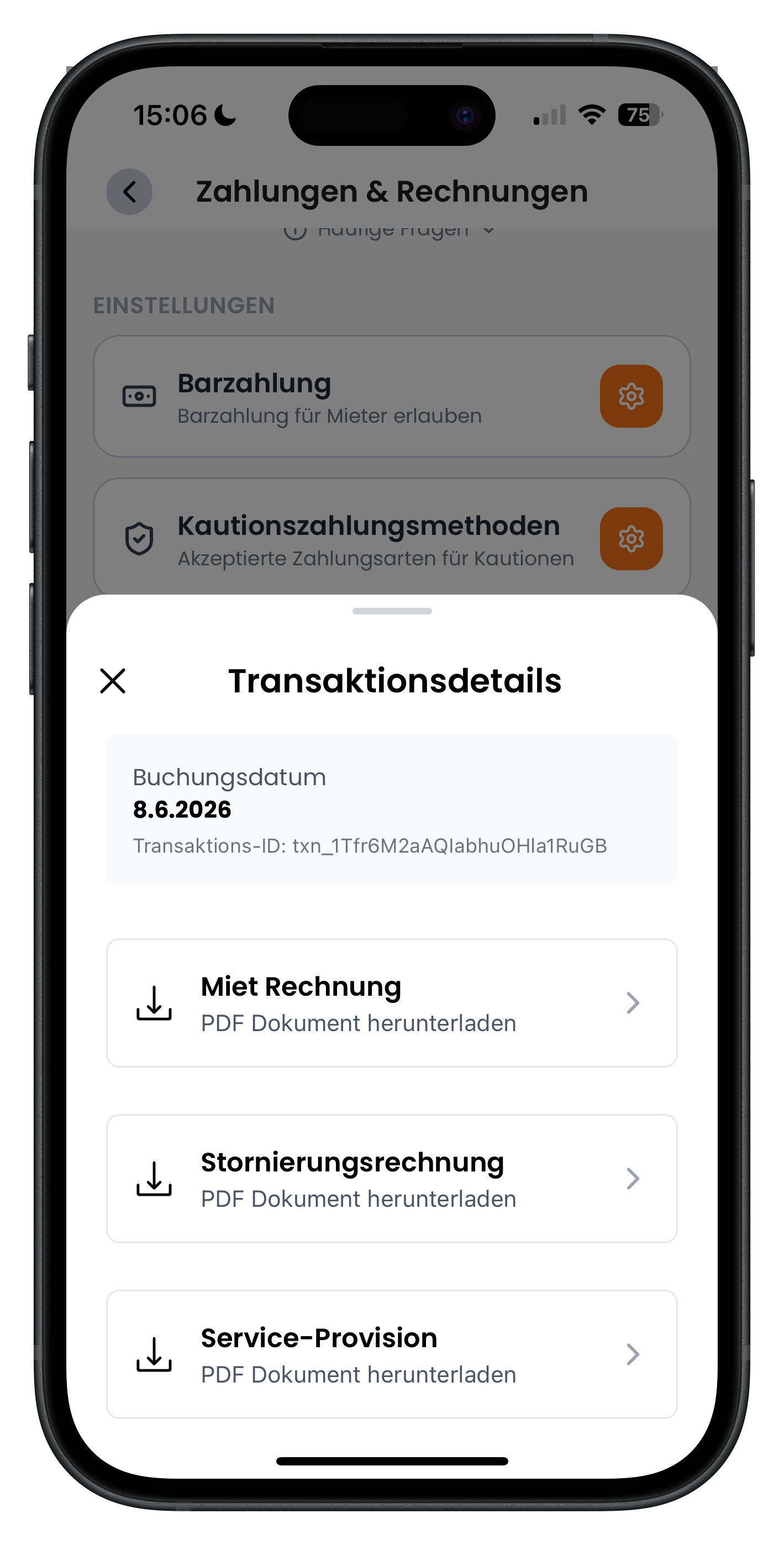
Tap an individual transaction to open the Transaction details view, which shows the booking date and a unique transaction ID. From there you can download all associated documents as PDFs: the Rental invoice (issued in the host's name), the Service fee invoice (the platform fee charged by Drivable), and, if applicable, a Cancellation invoice. This gives you clean documentation for your accounting for every transaction.
- Rental invoice: your record of the rental income, issued in the host's name
- Service fee: the invoice for the platform commission
- Cancellation invoice: only appears if the booking was cancelled
- Every document is available as a downloadable PDF
9
Expanding FAQs directly inside the wallet
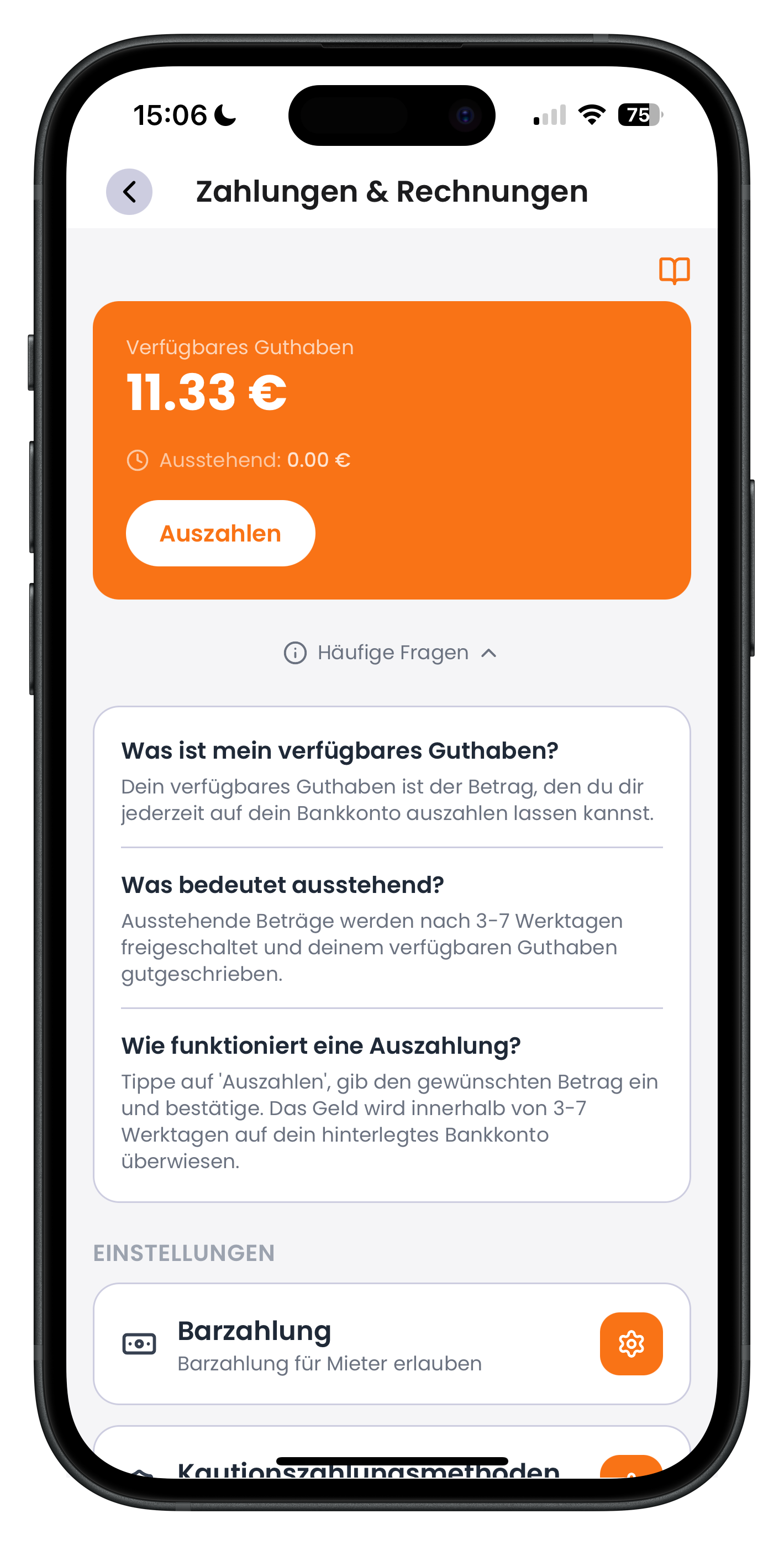
Below the balance block you'll find a FAQs section. Tap it to expand a short Q&A menu that explains the key points right there in the app. For example, it covers what your available balance is (the amount you can withdraw at any time), what pending means (released after 3 to 7 business days), and how a payout works. Handy when you need a quick answer without leaving the app.
- "What is my available balance?" explains the amount you can withdraw immediately
- "What does pending mean?" explains the 3 to 7 business days processing time
- "How does a payout work?" walks you through the withdrawal process
Next steps
Your wallet is all set up and you now know how balances, payouts, and invoices work. For a complete overview of your enquiries, reviews, and key metrics, head to the Host dashboard. Cash payment deposit, deposit, and rental price settings are configured when you create your listings — see Create a listing for details. And if your business details or payout account ever change, you'll find everything under Managing your host profile & business details.
Frequently asked questions

Drivable Team
Help & Support
Das Drivable Team erklärt dir Schritt für Schritt, wie du die Plattform und App nutzen kannst.
21. Juni 2026
War dieser Artikel hilfreich?